 HajperTalk
Building A Modern Website
Part 10: Performance Engineering Early
Performance engineering early
Performance is often treated as something that happens near the end of a project.
The site is built, features are implemented and only then do we start measuring load times and Lighthouse scores. Whereas in practice, most performance issues are introduced much earlier. Architecture, dependencies, rendering strategies, images, fonts, and third-party scripts all influence performance long before a page reaches production.
Throughout this series we’ve talked about:
- defining requirements before implementation
- semantic HTML
- static site generation
- accessibility
- SEO
Performance is another layer built on top of those same foundations.
Just like accessibility and SEO, performance is rarely the result of one clever optimization. It is not something we add at the end. Instead, it emerges from multiple small engineering decisions made throughout a project.
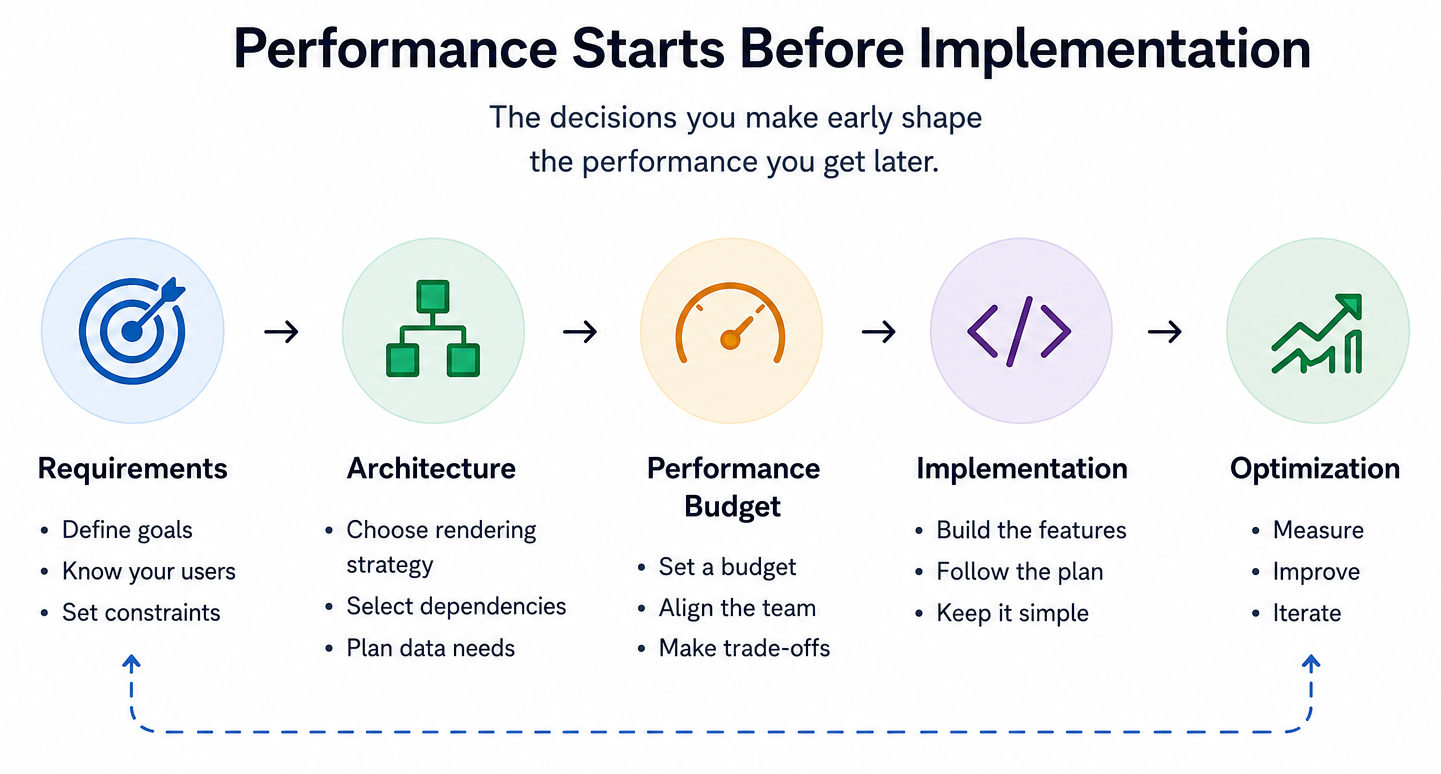
Performance starts before implementation
One of the biggest misconceptions about performance is that it can be fixed later.
While many issues can be improved after launch, the largest gains often come from decisions made before implementation begins. It could be choosing a static site approach instead of a client-heavy application, defining image requirements early or limiting third-party dependencies. Another decision to establish early is setting a performance budget. Before building the site, decide how much you’re willing to ship.
All these decisions influence every page that follows.
Instead of thinking We’ll optimize later. Try thinking Let’s avoid creating the problem in the first place.
Mental model
Requirements
      ↓
Architecture
      ↓
Performance Budget
      ↓
Implementation
      ↓
Optimization
By looking at this model we can see that Performance is not the final step, Optimization is.
Architecture is the biggest performance decision
In [Part 6: Static Site Approach] we discussed why we chose a static site approach for this series. One of the reasons was performance.
Before worrying about image formats or cutting a few kilobytes off a CSS file, it’s worth stepping back and looking at the overall architecture.
The browser has one simple goal: Render something meaningful as quickly as possible. How much work the browser needs to do before reaching that point depends heavily on how the application is built.
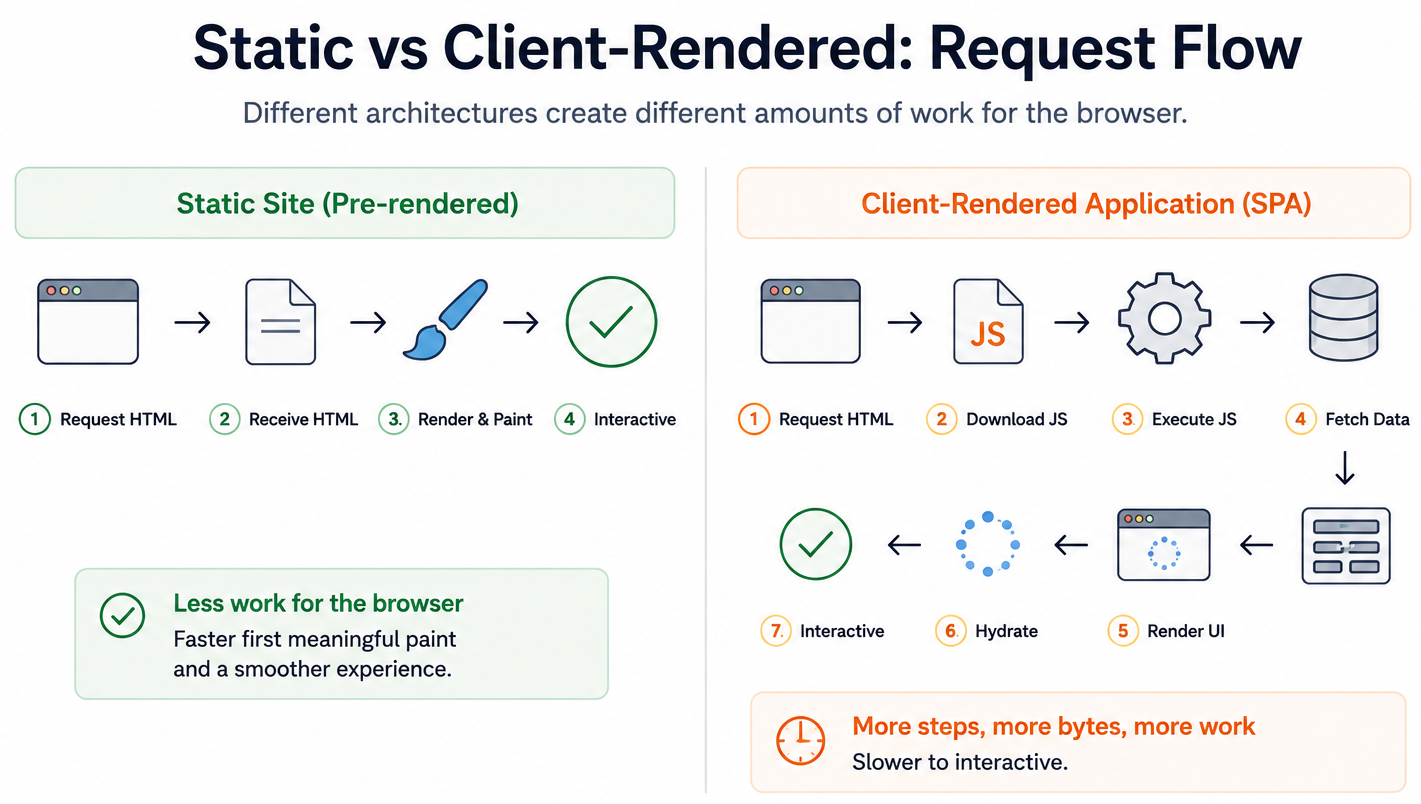
For a traditional static page, the browser typically:
1. Request HTML
      ↓
2. Parse HTML
      ↓
2.1 Download CSS
      ↓
3. Render the page
      ↓
4. Interactive
A client-heavy application often involves additional steps:
1. Request HTML
      ↓
2. Download JavaScript
      ↓
3. Parse, Interpret, Execute JavaScript
      ↓
4. Fetch content
      ↓
5. Render UI
      ↓
6. Hydrate Components
      ↓
7. Interactive
This does not mean every site should be static. It means architectural choices often have a larger impact than individual optimizations.
Images are usually the biggest win
When developers think about performance, it’s easy to focus on JavaScript. In reality, images are often responsible for the largest percentage of transferred data on a typical website.
Optimizing images is therefore one of the simplest ways to improve loading performance.
Consider the following example.
<img
    src="/images/team.jpg"
    alt="Our team">
This works perfectly but the browser doesn’t know how large the image is until it has downloaded enough of the file.
That means it cannot reserve any space beforehand. The result is a layout shift when the image finally appears.
Instead, provide the image dimensions.
<img
    src="/images/team.jpg"
    alt="Our team"
    width="1200"
    height="800">
Now the browser knows the aspect ratio immediately. It can reserve the correct space before downloading the image, significantly reducing layout shifts.
Using modern frameworks
Modern frameworks can simplify this even further.
Using SvelteKit’s Enhanced Images [Read more here], the previous example becomes:
<script>
    import team from '$lib/assets/team.jpg?enhanced';
</script>

<enhanced:img
    src={team}
    alt="Our team" />
Behind the scenes, SvelteKit automatically generates:
- responsive image sizes
srcset- width and height
- optimized image formats
- lazy loading where appropriate
Instead of remembering every optimization yourself, the tooling applies many of them automatically.
This is a good example of choosing tools that reduce the chance of human error.
JavaScript is often the biggest cost
While Images consume bandwidth, JavaScript consumes both bandwidth and CPU time. Unlike an image, JavaScript doesn’t simply get downloaded.
Browser Rendering Pipeline
Every byte of JavaScript goes through many steps before your users can interact. More JavaScript equals more work for the browser. This is why you should reduce what you ship and only when it’s needed.
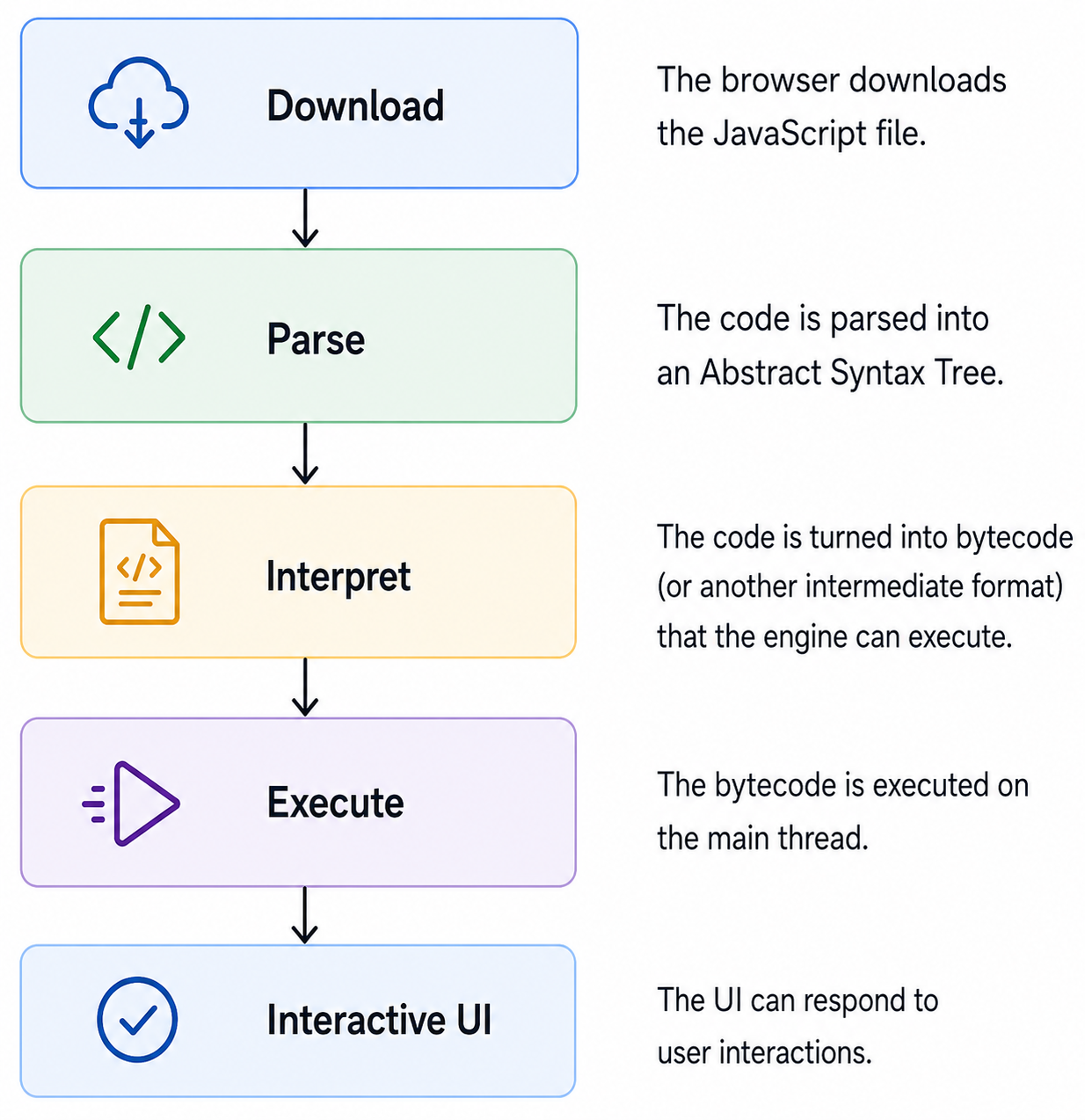
On a modern desktop computer, this process is often barely noticeable. On an older mobile device, however, JavaScript execution can become one of the largest performance bottlenecks.
Before installing another package, it’s worth considering if a few lines of vanilla JavaScript solve the problem just as well. Performance is not about avoiding frameworks or libraries. It’s about understanding the cost they introduce.
Establish a Performance budget
One practice that has become increasingly common in engineering teams is defining a performance budget before implementation begins.
A performance budget works much like any other engineering constraint. Instead of only looking at speed as performance (How fast is the website), we look at size (How much are we willing to ship) and uptime (How reliable is the website). A budget is a set of limits for both resource sizes and user experience.
An example budget might look like the following illustration.
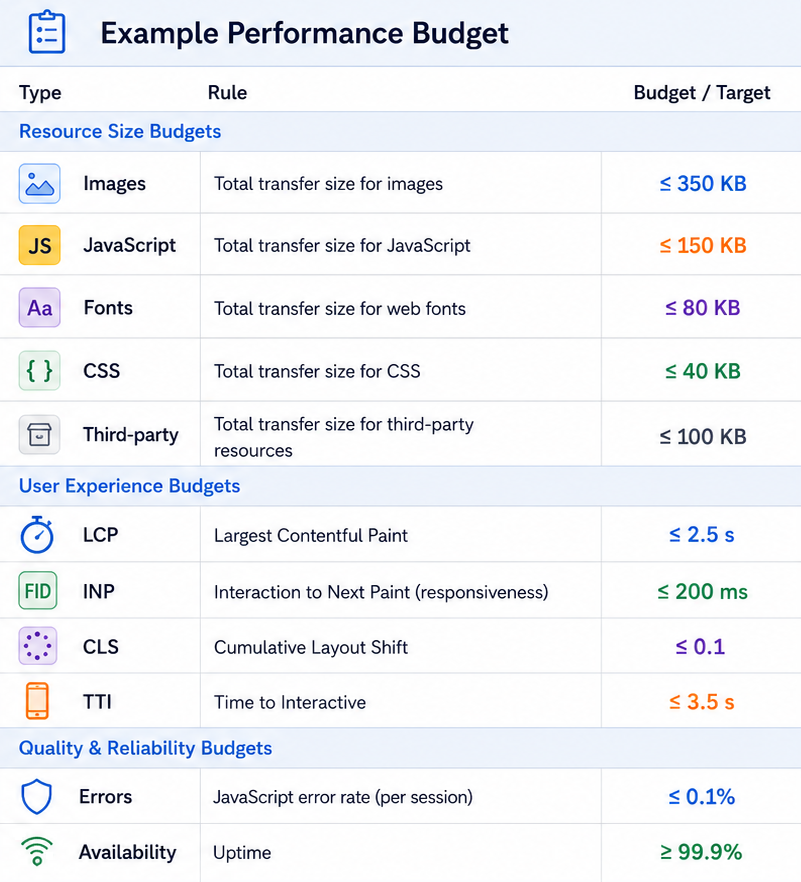
The important part isn’t that the numbers are perfect, it’s that the team agrees on constraints before development starts. By agreeing upon numbers force each team-member to consider each implementation decision and will encourage conversations much earlier in the project.
For a comprehensive overview of different types of performance budgets, the MDN Web Docs provide an excellent introduction: [MDN Performance budgets]
Fonts deserve more attention
Typography plays an important role in visual design, but fonts are also assets that need to be downloaded and rendered.
A common mistake is loading multiple font families, many font weights and large character sets without considering the impact. While convenient, this often downloads significantly more than the site actually needs. In many cases, fewer font files lead to both better performance and a simpler design system.
A more intentional approach is to self-host fonts and preload only the files required for the initial render.
<link
    rel="preload"
    href="/fonts/inter-variable.woff2"
    as="font"
    type="font/woff2"
    crossorigin>
Just like with images, the goal isn’t to optimize every byte. It’s to avoid shipping assets that users never benefit from.
Third-party scripts are not free
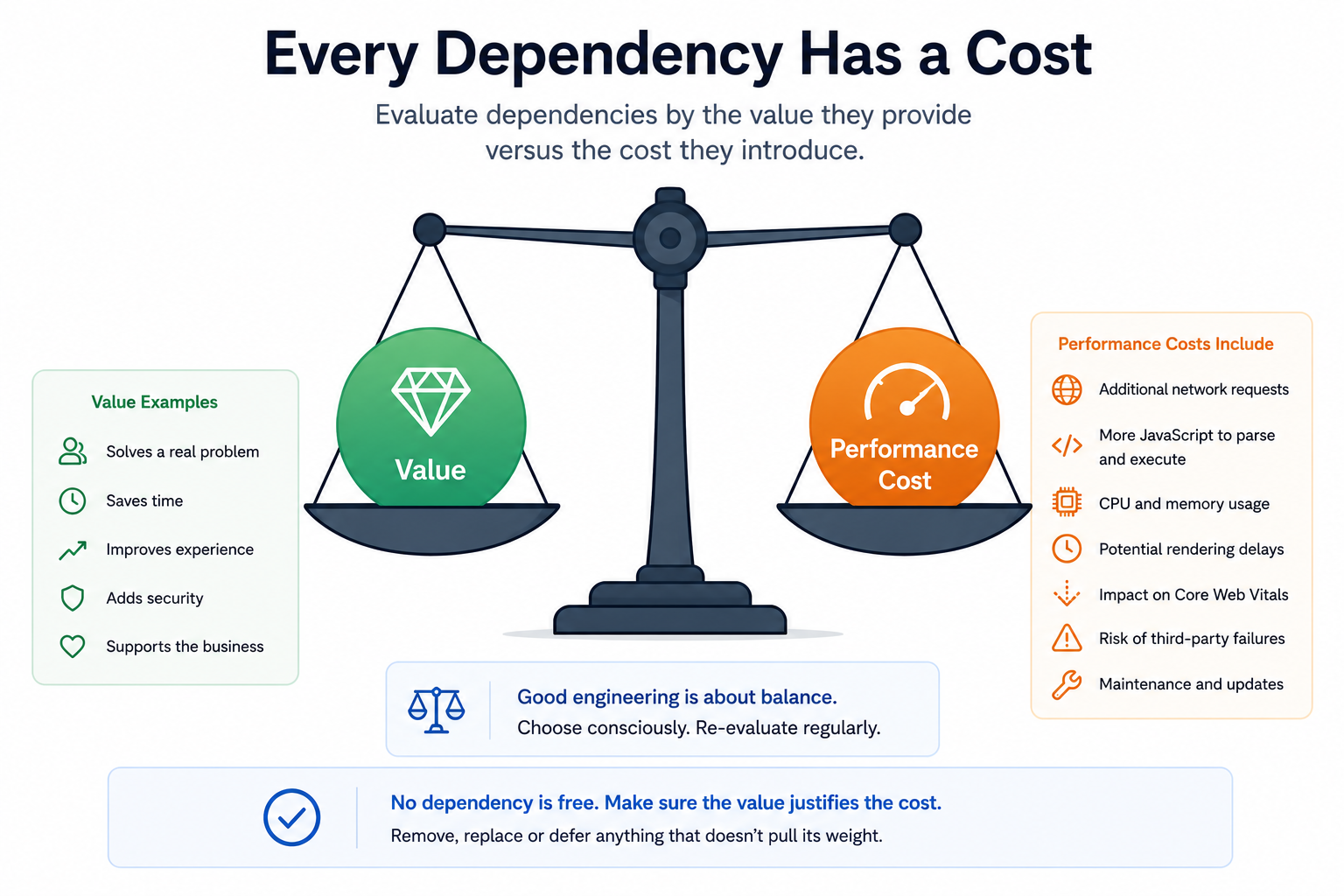
Analytics, cookie banners, chat widgets, tracking systems, and embedded services all introduce additional cost.
The challenge is that these costs are often invisible during development.
Each external script introduces additional work for the browser:
- network requests
- DNS lookups
- JavaScript execution
- memory usage
- potential rendering delays
When evaluating a third-party service, it is worth considering not only what it provides, but also what it costs.
Measuring performance
Performance should be measured, not assumed.
Tools like:
- Lighthouse
- PageSpeed Insights
- WebPageTest
- browser developer tools
can provide useful insights how a page behaves.
One of the most useful views is often the Network panel/tab.
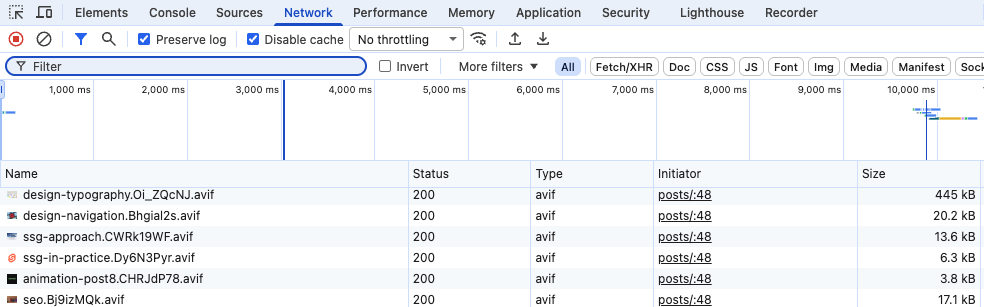
Within a few seconds you can usually answer questions like:
- What are the largest resources?
- Which requests block rendering?
- Are we downloading unnecessary assets?
- Which third-party scripts are loaded?
However, metrics should be viewed as indicators rather than goals.
The danger of chasing scores
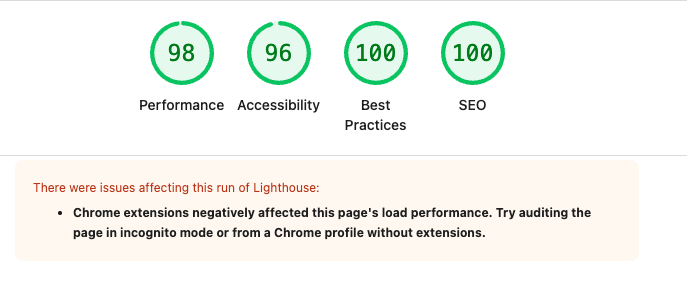
It is easy to become focused on achieving a perfect score, we have all done it. A score of 100 can feel satisfying.
But users never experience a Lighthouse report. They experience the website.
Improving a metric is valuable (only) when it improves the experience. Improving a metric solely to improve the metric is often less useful.
Performance is ultimately measured by how quickly users can accomplish their task, not by how many green circles appear in a report.
Connecting back to the bigger picture
If you’ve followed this series from the beginning, you may have noticed a recurring theme.
Good websites are rarely the result of one brilliant decision. They’re the result of many sensible decisions made consistently. Performance is no different.
Looking back at the mental model we introduced in Part 1:
Requirements
      ↓
Structure (HTML)
      ↓
Layout & Styling (CSS)
      ↓
Behavior (JavaScript)
      ↓
Enhancement (Animations)
      ↓
Performance
Performance is not something that sits beside these layers. It emerges from them.
- Semantic HTML reduces unnecessary complexity.
- Static rendering reduces browser work.
- Thoughtful JavaScript keeps execution costs low.
- Well-optimized images reduce bandwidth.
- Carefully selected dependencies keep the application maintainable.
Performance is often a reflection of every engineering decision that came before it.
Summary
Most performance problems are introduced long before they are measured.
By the time a Lighthouse report highlights an issue, the underlying decision may have been made weeks or months earlier.
The most effective performance work often happens at the architectural level. Not because individual optimizations do not matter, but because good foundations make those optimizations easier and more effective.
Don’t think of performance as getting fast metrics, think of it as getting a fast experience.
Closing thoughts of the Building A Modern Website series
When we started writing this series, the goal wasn’t to build the ultimate guide to modern web development. That would be impossible. The web evolves too quickly and no single series can cover every technique, framework, browser API or optimization.
Instead, we wanted to focus on something more fundamental. The engineering decisions that tend to outlive the tools we use.
Throughout these ten parts we’ve explored:
- defining requirements before writing code
- semantic HTML
- CSS architecture
- typography
- accessible navigation
- static site generation
- modern tooling with SvelteKit as an example framework
- thoughtful animation
- SEO through structure
- performance as an architectural concern
Good semantic HTML improves accessibility -> Accessibility often improves SEO.
A static architecture simplifies performance -> Performance improves user experience.
Each decision strengthens the next. That(!), more than any individual framework or library, has been the central idea of this series.
What we didn’t cover
There are many topics that deserve their own discussion and some of them could easily become a series of its own.
For example:
- authentication and authorization
- content management systems
- testing strategies
- deployment pipelines
- security
- browser APIs
- component libraries
Rather than trying to cover everything, We chose to focus on the engineering principles that remain valuable regardless of which framework or technology you use.
One final thought
Back in the days when building a website, the challenge was simply getting something to appear on the screen.
Today we have incredible tools, modern frameworks, build pipelines, image optimization, accessibility tooling, static site generation and last but not least… AI assistants.
The technology has changed dramatically. What hasn’t changed is the value of good engineering. Understanding why we make certain decisions will almost always outlast knowing how to use a particular library. Frameworks will come and go, best practices will evolve, but simple solutions and thoughtful engineering tend to age remarkably well.
We hope this series has encouraged you to think a little more about the why behind modern web development, not just the how (AI can fix that 😉).
And remember… The best websites rarely begin with code. They begin with good decisions. Everything else is simply the implementation.